

Conjuguemos Live: How to Join, Log In & Play (2026)
- August 19, 2026
- 0
If your teacher has just given you a code and told you to “go on Conjuguemos Live”, you don’t need an account, a download, or a login to



9621 Agnes Crossing, Lake Suzanneview, New Mexico Island 84604-9295.
If your teacher has just given you a code and told you to “go on Conjuguemos Live”, you don’t need an account, a download, or a login to
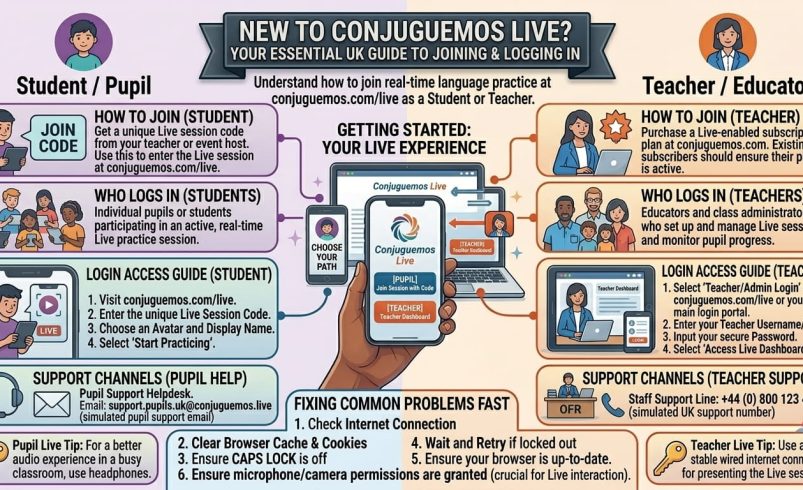
If your teacher has just given you a code and told you to “go on Conjuguemos Live”, you don’t need an account, a download, or a login to get started. Conjuguemos Live is the real-time game mode built into conjuguemos.com, the verb and vocabulary practice site used by millions of language students worldwide. You simply open conjuguemos.com/live on any browser, type in the code your teacher shares, add your name, and you’re straight into a multiplayer round.
This guide covers everything a UK student, parent or teacher needs: joining a game, logging in properly if you have an account, the games on offer, what it costs if your school wants the paid version, and fixes for the problems that trip people up most.
Conjuguemos Live is the live, multiplayer side of Conjuguemos, a language practice platform that’s been running since 2000 and is now used across more than 32,000 schools. While the main site is built around solo drills, verb charts and vocabulary sets, the Live mode turns those same questions into timed, competitive games that a whole class can join at once using a single shared code.
It’s not a separate app or a separate account system. It’s simply a game lobby that sits on top of the same question bank teachers already use for homework and classwork.
Type conjuguemos.com/live directly into your browser’s address bar, or click the join link your teacher has shared (it usually leads straight there). You’ll land on a simple two-box screen: one for the game code, one for your name.
There’s no separate “app” to install. The site works fine in Safari, Chrome, Edge or Firefox on a laptop, tablet or phone, so a school Chromebook or a personal mobile both work.
A quick word of caution: double-check the spelling before you search. Lookalike domains such as conjuguemos.live (without “.com”) exist and aren’t run by the official platform, so always type conjuguemos.com/live rather than trusting the first result in a search engine.
Getting into a session takes under a minute once you have the code.
You don’t need to create an account or remember a password to join this way. The code is time-limited to that specific lesson, so it won’t work once the teacher closes the session.
If nobody has shared a code with you, you can’t join a live match on your own; Live mode needs an active session created by a teacher or another student with a paid plan. In that case, head to the regular Conjuguemos activities pages instead (conjuguemos.com/activities) and pick a single-player verb or vocabulary set to practise the same content without waiting for a code.
When the round finishes, you’ll see your score and, in most game modes, how you compared with classmates on the results screen. Nothing else is saved to your device. If you’re logged into a linked student account, your result is recorded automatically against your teacher’s gradebook; if you joined as a guest, it isn’t stored anywhere once you close the tab.
You only need to log in if you want your scores tracked over time, or if you’re the teacher running the show. There are two account types, and they behave differently.
Student accounts are free and link to a teacher using a teacher code, so your homework scores and progress land automatically in your teacher’s gradebook. Sign up at conjuguemos.com/auth/create_student, then log in at conjuguemos.com/auth/login whenever you want to practise outside of a live session.
Teacher accounts come in a free tier and a paid Premium tier (more on pricing below). Teachers log in the same way, at conjuguemos.com/auth/login, then use their dashboard to build and launch Live sessions for a class.
If you already have a student or teacher account, log in from the main site first (conjuguemos.com/auth/login), not from the /live join screen itself; the /live page is built purely for entering a code, not for signing in. Once you’re logged in on the main site, any Live game you join afterwards will link your result to your account automatically, so there’s no separate conjuguemos.com/live login form to look for.
Click “Log In”, then “Forgot password” on the login screen, and a reset link is sent to the email address on file. If a student account was created and managed by a teacher, the fastest fix is usually asking the teacher to reset it from their dashboard rather than waiting on an email that might go to a school inbox nobody checks.
Setting up a session takes a few clicks once you’re logged into a teacher account.
The exercises are always verb conjugations, vocabulary or grammar questions from your teacher’s chosen set; what changes is the game wrapped around them.
| Game | How it plays | Best for |
| Battleship | Answer correctly to fire at a hidden grid | Verb conjugations, accuracy practice |
| Connect Four | Correct answers place a counter on a grid | Vocabulary themes, matching |
| Tic-Tac-Toe | Quick three-in-a-row rounds | Fast warm-ups, endings and articles |
| Tug-of-War | Teams pull a marker with each correct answer | Whole-class energy, team play |
| Word Search | Speed-based word spotting | Spelling and accent marks |
| Empanada Gobbler | A character “eats” correct answers for points | Light review, mixed ability groups |
| Shark Tank | Casual points-based review game | End-of-topic recaps |
Most sets support several of these game types, so a teacher can rotate formats across a term without changing the underlying content students are practising.
Spanish and French have the largest question banks by far, which makes sense given they’re the two most widely taught languages in UK secondary schools. Beyond those, the platform also covers German, Italian, Portuguese, Latin and Korean, though the depth of content varies by language, with Spanish offering by far the widest range of verb tenses, vocabulary themes and grammar sets.
If your subject is German or Italian GCSE, check the specific topic you need is covered before relying on it for a full scheme of work; coverage is strongest for core tenses and common vocabulary, thinner for niche or exam-board-specific topics.
For students, Conjuguemos is free in full. You get unlimited access to public activities, games and printables, and unlimited grade tracking, at no cost, provided your teacher has set up a class for you to join.
For teachers, there’s a genuine free tier alongside a paid one:
| Plan | Price (billed in USD) | Approx. £ (at today’s rate) | What you get |
| Teacher Free | $0/year | £0 | Unlimited access to public activities; up to 5 teacher-created activities; up to 25 stored grades |
| Teacher Premium | $45/year | roughly £34/year | Unlimited teacher-created activities and stored grades; ad-free add-on for a further $25 (roughly £19) |
| District/School | $45 per school + $5 per teacher, per year | roughly £34 + £4 per teacher | Everything in Premium, plus sharing between colleagues; ad-free add-on for $45 (roughly £34) |
Worth knowing for UK buyers: Conjuguemos charges in US dollars only; there’s no separate GBP price list, and your school will pay whatever your card provider converts the dollar amount to on the day, plus any card conversion fee. Prices and exchange rates both move, so check the live figure at conjuguemos.com/pricing before a school signs off on a purchase order.
The code doesn’t work. Codes are session-specific and expire once a teacher closes the game or the lesson ends, so double-check you’ve got the current one rather than one from a previous lesson.
The page won’t load or freezes mid-game. This is almost always a school network or Wi-Fi issue rather than a Conjuguemos problem; try refreshing, switching from school Wi-Fi to mobile data briefly to confirm, or closing other tabs eating bandwidth.
A student’s score didn’t save. Scores only save automatically to a gradebook if the student was logged into a linked account when they played; a guest join (code plus name only, no login) never saves anywhere once the tab closes.
Can’t remember which login to use. Students use conjuguemos.com/auth/login with the email or username set up when their teacher created the account; teachers use the same login page with their own registered email.
Sound or visuals not working on a school iPad. Check the browser (not a locked-down kiosk app) has permission for audio and isn’t in low-power mode, as some school device management profiles mute audio by default.
[Screenshot: Example of a common “invalid code” error message and where to check the correct code]
Most guides to this platform are written for a US audience and skip over how it maps onto UK teaching. In practice, MFL departments tend to use Conjuguemos Live in three ways: as a five-minute starter to activate prior knowledge on a specific tense before a GCSE Spanish or French lesson, as a low-stakes revision tool ahead of speaking or writing assessments where quick recall of verb forms matters most, and as cover work, since a substitute teacher can run a pre-built session without needing subject expertise.
It sits alongside, rather than replaces, exam-board-specific resources. The verb and tense coverage lines up well with what AQA, Edexcel and Eduqas GCSE specifications expect for regular and high-frequency irregular verbs, but it isn’t built around any single exam board’s vocabulary list, so departments still need their own resources for exam-specific topics and higher-tier vocabulary.
If a specific feature is missing for your class, a couple of comparable tools are worth knowing about. Kahoot offers similar live, code-based multiplayer quizzing but isn’t built specifically around verb conjugation, so question-writing takes longer. Quizlet Live covers vocabulary well through its Live mode but has less depth on verb tenses and grammar than Conjuguemos.
Neither is a straight swap; most MFL teachers who use Conjuguemos Live keep it specifically for grammar and conjugation practice, and use other tools for general vocabulary quizzing or listening tasks.
No. Students can join any live session as a guest by entering the code and their name at conjuguemos.com/live, with no account or login required. An account is only needed if you want scores tracked automatically over time in a teacher’s gradebook.
They’re part of the same platform. Conjuguemos.com is the main site with practice activities, verb charts and account management, while conjuguemos.com/live is specifically the join screen for real-time multiplayer games hosted by a teacher.
Go to conjuguemos.com/auth/login and enter your registered email and password. This is the same login page for both teacher and student accounts; the site recognises which type of account you have once you’re signed in.
Student use and a teacher free tier are both genuinely free, covering unlimited access to public activities and up to 25 stored grades. A paid Premium teacher plan at $45 a year (roughly £34) removes those limits and adds unlimited teacher-created activities and grade storage.
The most likely reason is that the code has expired, since each one is tied to a single live session and stops working once the teacher ends it or the lesson finishes. Ask for the current code rather than reusing one from an earlier class.
Yes. The site is mobile-friendly and works in a standard browser on iOS or Android, so no separate app download is needed to join a session.
Spanish and French have the deepest content, alongside German, Italian, Portuguese, Latin and Korean with narrower coverage. Check your specific topic is included before building a full lesson around it in a less widely covered language.
Only for students who are logged into an account linked to their teacher when they play, since guest players who join with just a code and name have no results saved once the game ends.