


SFM Compiler Guide: How to Compile Models in Source Filmmaker
- August 20, 2026
- 0
If you’ve dropped a custom model into Source Filmmaker and watched it show up as a purple and black checkerboard, you’ve just met the reason the SFM compiler



9621 Agnes Crossing, Lake Suzanneview, New Mexico Island 84604-9295.
If you’ve dropped a custom model into Source Filmmaker and watched it show up as a purple and black checkerboard, you’ve just met the reason the SFM compiler
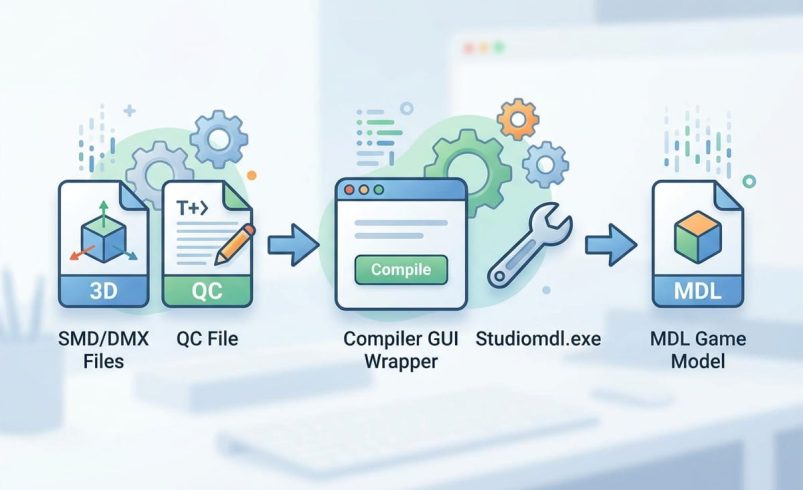
If you’ve dropped a custom model into Source Filmmaker and watched it show up as a purple and black checkerboard, you’ve just met the reason the SFM compiler exists. Raw 3D files from Blender or Maya don’t just work in SFM straight away. They need converting into a format the Source engine understands, and that conversion process is what people mean when they talk about an SFM compiler.
This guide covers what the compiler actually does, the free tools you need, how to write a working QC file, and how to fix the errors that catch out almost every beginner. By the end, you’ll be able to compile your own models with confidence rather than guessing at command-line syntax.
Source Filmmaker (SFM) is a free 3D animation tool built by Valve, first released in June 2012. It uses the Source engine, the same engine behind Team Fortress 2 and Half-Life 2, to let creators pose characters, set up scenes and render animated films using game assets.
It’s available through Steam as a free download, and it’s a substantial piece of software, weighing in at roughly 15.7GB installed. Newer Valve titles like Half-Life: Alyx run on Source 2 instead, which uses a separate but related tool called Source 2 Filmmaker (S2FM). This guide focuses on the original SFM compiler workflow, since that’s still what most custom model creators and the wider Steam Workshop community use.
The SFM compiler converts a 3D model from a standard format, such as OBJ or FBX, into the MDL format that the Source engine can read. Standard 3D formats don’t contain the engine-specific data Source needs, so without compiling, a model either fails to load or shows up broken with missing textures.
During compilation, the tool bundles several things into one package:
The output isn’t a single file. A compiled model produces an MDL file alongside VVD, VTX and PHY files, and all of them need to sit together correctly for the model to work in SFM.
[Table: Compiled file types and what each one does, MDL, VVD, VTX, PHY]
You don’t need to pay for anything to get a working SFM compile setup. Here’s what most creators actually use:
Paid alternatives like 3ds Max and Maya exist too, priced at roughly $1,700 a year each, but they’re not necessary unless you’re already using them for other work. For UK creators on a hobby budget, the free stack of Blender, Crowbar and Notepad++ covers everything most SFM projects need.
The QC file is the instruction sheet that tells the compiler how to build your model. It’s a plain text file, and it controls:
A single typo or an incorrect file path in the QC file is the single most common reason a compile fails, so it’s worth double-checking every path against your actual folder structure before running the compiler. Organise your model, textures and QC file into clearly named folders first, since a messy file structure makes debugging far harder later.
Once your QC file and assets are ready, running the compile itself is fairly quick:
If you’d rather work directly from the command line instead of using Crowbar, you can run studiomdl.exe manually with your QC file as a parameter, though this requires more comfort with terminal commands and gives less immediate visual feedback than Crowbar does.
Almost every beginner hits the same handful of problems, so these are worth checking first before assuming something’s seriously wrong.
Community-run help spaces exist specifically for troubleshooting these issues, and it’s worth searching for the exact error text the compiler gives you, since most compile errors have been hit by someone else already.
Most SFM creators don’t build every model from scratch. Custom models, props and characters are commonly shared through the Steam Workshop and dedicated model-sharing sites within the SFM community, though quality and compile-readiness vary a lot between uploads.
Downloaded models sometimes come already compiled and ready to use directly in SFM, while others are provided as source files that still need compiling yourself using the process above. If a downloaded model behaves oddly during compiling, it’s often because the uploader’s own file paths or QC settings don’t match your folder setup, so you may need to adjust the QC file yourself rather than assume the model is broken.
SFM compile converts 3D model files from formats like OBJ or FBX into the MDL format that Source Filmmaker and the Source engine can actually read. Without this step, custom models either won’t load or will appear broken with missing textures.
Yes, Source Filmmaker is completely free to download through Steam, and all you need is a free Steam account to get started. It’s a large download at around 15.7GB, so a decent broadband connection helps.
Studiomdl.exe is Valve’s original command-line compiler, while Crowbar is a free, community-built graphical tool that wraps studiomdl in a visual interface. Crowbar is generally easier for beginners since it shows compile logs and errors without needing to type terminal commands.
This almost always means a texture or material path in your QC file doesn’t match where the actual texture file is stored. Double-checking every file path against your real folder structure usually solves it.
Not strictly, but Blender is the most common tool SFM creators use to prepare models before compiling, mainly because it’s free and has strong Source-engine export plugins. Paid tools like 3ds Max or Maya work too, but cost around $1,700 a year each.
A completed compile produces an MDL file, along with VVD, VTX and PHY files, all of which need to sit together correctly for the model to work. The MDL file is the main model reference, while the others handle geometry, rendering data and physics.
Sometimes. Many Workshop uploads are already compiled and ready to drop straight into SFM, while others are shared as source files that still need compiling using your own QC file and Crowbar or studiomdl setup.
This usually happens when the skeleton in your source file doesn’t match what the QC file expects, which is a common issue with models downloaded from third-party sites rather than built from scratch. Checking the bone structure against the QC file’s skeleton settings usually identifies the mismatch.