

Merrick Bank Login: Sign In, Activate Card & Make Payments
- August 19, 2026
- 0
Trying to sort out your Merrick Bank credit card login and not sure where to start? The official login and account management site is merrickbank.com, with a dedicated



9621 Agnes Crossing, Lake Suzanneview, New Mexico Island 84604-9295.
Trying to sort out your Merrick Bank credit card login and not sure where to start? The official login and account management site is merrickbank.com, with a dedicated
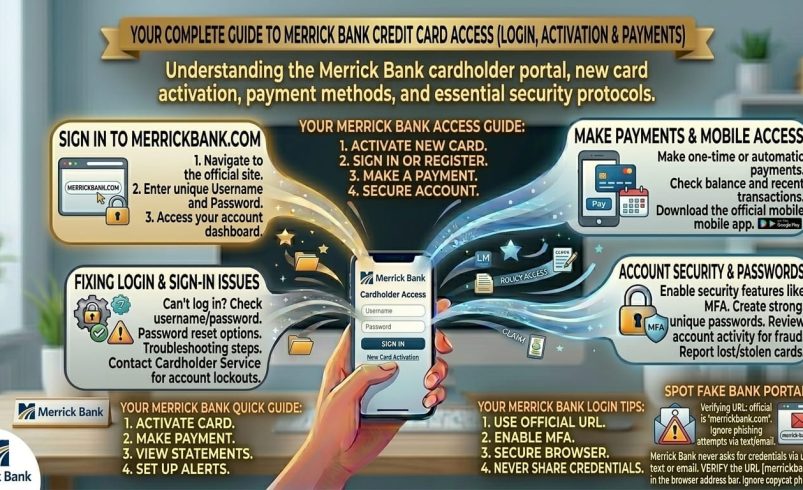
Trying to sort out your Merrick Bank credit card login and not sure where to start? The official login and account management site is merrickbank.com, with a dedicated logon portal at logon.merrickbank.com, and that’s the only place you should ever enter your card number or password. This guide covers logging in, activating a new card, making a payment, and fixing the most common access problems.
Merrick Bank is best known for credit-building Mastercards aimed at people establishing or rebuilding credit, along with several co-branded cards issued for other companies. Whether you just got a new card in the mail or you’re trying to log into an account you’ve had for years, everything below walks through it.
Merrick Bank is a Utah-based, FDIC-insured bank that’s been issuing credit cards since 1997. It’s particularly well known for cards aimed at people building or repairing credit, often featuring automatic credit limit increase reviews and free access to a FICO Score through the mobile app.
Merrick Bank also issues cards on behalf of other brands, meaning if you have a card that says something else on the front (Nationwide Visa is one example), it may still be a Merrick Bank account behind the scenes, managed through the same merrickbank.com system.
If you’ve already registered your account online, logging back in is quick.
Bookmark the logon page directly once you’ve confirmed it’s the right one, rather than searching for it fresh every time, since that habit is exactly how people end up on unofficial lookalike sites.
If you’ve just received a new card in the mail, it needs activating before you can use it, and that’s a separate step from setting up online account access.
Activation links are one of the more common targets for phishing scams in general, since a new cardholder is primed to expect exactly this kind of email or text. If you got a link to “activate” your Merrick Bank card through a text message, it’s worth typing merrickbank.com/activate in yourself rather than tapping the link directly, just to be safe.
Activating your physical card and setting up online access are two different things, and a fair number of people miss that.
To enrol for the first time, go to merrickbank.com and look for “Not enrolled” on the online banking login page, or head straight to merrickbank.com/enroll. You’ll typically need your card number and some identifying information to verify the account is yours, then you’ll set a username and password for future logins.
If your card was issued under another brand’s name rather than “Merrick Bank” directly, meaning something like a retailer or partner card, you may be directed to a slightly different address: merrickbank.com/cardholdercenter.
This still runs through Merrick Bank’s systems, since they’re the actual card issuer behind these partnerships, but co-branded accounts sometimes need a separate enrolment step even if you’ve used Merrick Bank’s main site before. If you’re not sure which login applies to your specific card, checking the back of the physical card or a recent statement for the exact web address is the most reliable way to confirm.
Once logged in, paying your Merrick Bank credit card bill is handled directly through the same dashboard as everything else.
Log into your account, find the payment section (usually labelled something like “Make a Payment” or “Pay Bill”), choose the amount and date, and select which bank account to pay from. Merrick Bank also supports setting up recurring automatic payments if you’d rather not manually pay each month, which is worth considering if missed due dates have been an issue.
As with most card issuers, your exact due date, minimum payment, and any fees are specific to your account and outlined in your monthly statement and cardholder agreement, so it’s worth checking those directly rather than assuming they match what another cardholder has.
Merrick Bank offers a mobile app (Merrick Bank Mobile) available for iPhone and Android, which mirrors much of what’s available on the desktop site. Through the app, you can check balances and transactions in real time, schedule payments, view your FICO Score, set custom alerts, and access monthly statements, with fingerprint or face recognition sign-in on supported devices.
If you’re new to Merrick Bank, the app directs you to merrickbank.com/enroll to set up your account before you can sign in, so download it and get your online account sorted first if you haven’t already.
Locked out is one of the most common reasons people end up looking for Merrick Bank login help.
If you’ve forgotten your password, look for a “Forgot Password” or similar link on the logon page, which will walk you through identity verification, usually through your registered email or a security question. If you’ve forgotten your username as well, there’s typically a separate recovery option for that, or you can contact Merrick Bank’s customer service line directly, which is listed on the back of your card and on merrickbank.com.
Avoid guessing repeatedly, since too many failed attempts can lock the account temporarily and make the process slower rather than faster.
This deserves its own section, because it matters more here than with most account logins. New card activation links, in general, are one of the most commonly spoofed types of financial email or text, since scammers know a new cardholder is actively expecting exactly that kind of message.
A few habits genuinely protect you:
A handful of issues come up repeatedly for cardholders trying to get into their account.
Page won’t load. This is usually a browser issue rather than an account problem. Clear your cache and cookies, try a different browser, or switch networks if you’re on an unreliable connection.
Activation won’t go through. Double check you’re entering the card number and expiration date exactly as printed, with no extra spaces. If it still fails after a couple of tries, calling the number on the back of the card is faster than repeated attempts online.
Verification code never arrives. Confirm the phone number or email on file is current. If it’s outdated, customer service can help update it, though this may require some identity verification over the phone first.
Account locked after failed login attempts. Most systems like this lock temporarily after several incorrect tries. If waiting doesn’t resolve it, Merrick Bank’s customer service line can help reset access directly.
Go directly to merrickbank.com/activate and enter your new card’s number, expiration date, and identifying details like the last four digits of your Social Security number when prompted. Type the address in yourself rather than clicking a link from a text or email, since activation links are a common phishing target.
Activating your physical card at merrickbank.com/activate makes it usable for purchases, while setting up online access at merrickbank.com/enroll lets you view your account, make payments, and check your balance online. They’re separate steps, and you’ll likely want to do both when a new card arrives.
Go to merrickbank.com and click “Customer Log In,” or go directly to logon.merrickbank.com, then enter your username and password. If you haven’t set up online access yet, you’ll need to enrol first using your card details.
It’s a login destination, at merrickbank.com/cardholdercenter, used mainly for co-branded cards issued by Merrick Bank on behalf of other companies, such as certain retailer or partner Visa cards. It runs through the same Merrick Bank systems but sometimes needs a separate enrolment from the main site.
Log into your account online or through the mobile app, then use the “Make a Payment” option to choose an amount, date, and funding source. Automatic recurring payments can also be set up if you’d rather not pay manually each month.
Use the “Forgot Password” link on the logon page, which verifies your identity through your registered email or a security question. If that doesn’t resolve it, Merrick Bank’s customer service number on the back of your card can help directly.
Yes, Merrick Bank is a legitimate, FDIC-insured bank based in Utah that’s issued credit cards since 1997, with a particular focus on cards for people building or rebuilding credit. It’s a genuine bank, not a third-party card servicer.
Yes, if you have the Merrick Bank Mobile app, your FICO Score is available to view for free as one of the app’s features. This is a common perk on Merrick Bank’s credit-building cards specifically.