Best YouTube Downloader 2026: 6 Tools Tested for the UK
- August 19, 2026
- 0
If you’re after the best YouTube downloader, the short answer depends on what you need: yt-dlp is the most reliable free option for anyone comfortable with a simple



9621 Agnes Crossing, Lake Suzanneview, New Mexico Island 84604-9295.
If you’re after the best YouTube downloader, the short answer depends on what you need: yt-dlp is the most reliable free option for anyone comfortable with a simple
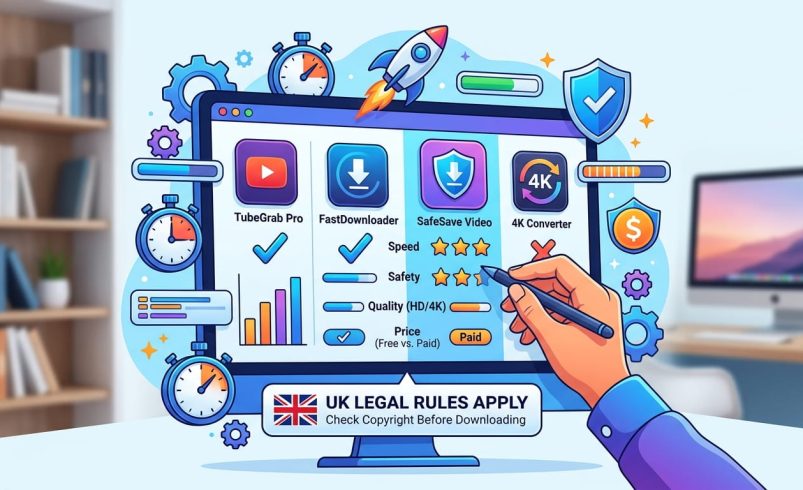
If you’re after the best YouTube downloader, the short answer depends on what you need: yt-dlp is the most reliable free option for anyone comfortable with a simple command, 4K Video Downloader Plus is the best paid desktop app at £20 for a lifetime licence, and ClipGrab is the best free tool with a proper visual interface if you’d rather avoid typing commands.
Before you download anything, there’s one thing worth knowing upfront: YouTube’s terms of service don’t permit downloading videos unless YouTube itself provides a download button, such as through YouTube Premium, or the video’s owner has given you explicit permission. This guide covers the best youtube downloader tools available right now, how to use them safely, what’s actually legal in the UK, and the official alternative that sidesteps the whole question.
This is worth addressing honestly rather than skating past it. Under the Copyright, Designs and Patents Act 1988, most videos on YouTube are protected works, and downloading a copy without the rights holder’s permission technically infringes that copyright, regardless of whether you share the file with anyone else. YouTube’s own terms of service separately prohibit downloading content except through features YouTube provides itself, like YouTube Premium’s official offline downloads, or where the uploader has explicitly allowed it.
In practice, individual enforcement against someone downloading a single video for personal, offline viewing is extremely rare, and it’s a very different situation from redistributing, reuploading, or profiting from someone else’s content, which does get pursued. Content licensed under Creative Commons, videos you’ve uploaded yourself, and material where the creator has explicitly said downloading is fine are all safe ground. When in doubt, treat downloading copyrighted content you don’t own as something to avoid, not a grey area to lean on.
Yt-dlp is an open-source command-line tool that most other downloaders, including several paid ones, actually run underneath their own interface. It’s updated roughly every two weeks by an active community, which matters because YouTube regularly changes its backend in ways that break less actively maintained tools. There’s no cost, no ads, and no bundled software, though you’ll need to be comfortable typing a short command rather than clicking through a visual interface.
This is the direct successor to the original 4K Video Downloader, which was discontinued on 1 February 2026, so make sure any link you follow points to the “Plus” version specifically. As of its 26.1.5 release on 17 June 2026, it continues to keep pace with YouTube’s changes, supports playlists, subtitles, and channel downloads, and costs around £20 for a lifetime licence rather than a subscription.
ClipGrab is genuinely open-source, meaning anyone can inspect the code behind it, which is a real point in its favour compared with closed, ad-funded alternatives. It’s completely free with no “pro” upsell, has a clean, ad-free desktop interface, and in 2026 added support for the AV1 codec YouTube increasingly uses for its videos. The main downside is that macOS sometimes flags the installer with an “unverified developer” warning, which you’ll need to approve manually in System Settings.
If you’d rather not install anything at all, VidsSave lets you paste a video link into a webpage, pick MP4 or MP3, and download directly. It’s lightweight and works across most platforms beyond YouTube too, though browser-based tools generally carry more advertising than dedicated desktop software, so expect a few pop-ups.
If you mainly want audio rather than video, MediaHuman focuses specifically on extracting music, and its “AcousticID” feature automatically tags downloaded tracks with the correct artist, album art, and lyrics. It’s strictly audio, so don’t expect video file support, and the free version runs at reduced speed until you buy a licence.
Freemake downloads videos in their original quality without re-encoding, which matters if you’re archiving something for later editing rather than just casual viewing. It’s a solid, established desktop option, though like several free tools on this list, watch the installer screens carefully for any pre-ticked bundled software offers.
A genuinely free tool, like yt-dlp or ClipGrab, has no paid tier at all and makes its money (if it makes any) through donations or community support rather than your data or your attention. A “freemium” tool, like 4K Video Downloader Plus’s trial or several browser-based sites, gives you a working free tier but paywalls things like 4K resolution, playlist downloads, or parallel downloads.
Watch out for a third category: sites that call themselves free but bury you in fake “download” buttons, forced browser extension installs, or ad redirects before you ever reach your file. If a tool needs a browser extension or a separate “manager” app just to save a single video, that’s a sign to look elsewhere.
Using a visual tool like ClipGrab or VidsSave, the process is usually the same three steps: copy the video’s URL from YouTube, paste it into the tool’s search or link box, then choose your format and resolution before clicking download. Most tools let you pick between MP4 for video and MP3 for audio-only extraction.
For yt-dlp specifically, once installed you open a terminal or command prompt and type yt-dlp followed by the video’s URL, which downloads the best available quality by default. Adding -f mp4 after the command restricts the download to MP4 format if you need compatibility with a specific device.
If you want a fully legal, hassle-free way to watch YouTube videos without an internet connection, YouTube’s own offline download feature inside the app does exactly that, and it’s built into a Premium subscription. As of July 2026, YouTube Premium in the UK costs around £12.99 a month for an individual plan, or roughly £129.99 a year if paid annually, working out to about £10.83 a month. A family plan covering up to six people in one household costs around £19.99 a month, and eligible students can get a discounted rate of around £7.99 a month through verification with SheerID.
Subscribing directly through YouTube’s website rather than the Apple App Store avoids the 20 to 30% surcharge Apple typically adds to in-app subscriptions. Prices for streaming services change fairly often, so check YouTube’s own pricing page before committing to a plan.
A handful of patterns show up consistently among riskier tools: apps that ask for far more device permissions than downloading a video should ever need, browser extensions with poor or non-existent reviews, and sites that show a wall of decoy “download” buttons designed to trigger ad clicks instead of your actual file. VidMate, a popular Android app for downloading video, isn’t available through Google Play and requires sideloading an APK from outside the official store, which carries meaningfully more risk than an app vetted through Play Protect.
If a tool asks you to disable your antivirus, grant accessibility permissions unrelated to file saving, or install a second “helper” application, stop and use something else instead.
Most of the tools already covered here handle audio extraction as a built-in option rather than needing a separate service. In yt-dlp, adding -x –audio-format mp3 to your command extracts just the audio track and converts it to MP3 automatically. In visual tools like ClipGrab or VidsSave, you’ll usually see an MP3 option sitting right alongside MP4 in the format dropdown before you download.
MediaHuman remains the strongest dedicated choice if music specifically, rather than occasional audio extraction, is your main use case, thanks to its automatic tagging feature.
On Android, VidMate remains one of the most widely used all-in-one options, though as noted above, sideloading it outside Google Play carries some risk you should weigh against the convenience. On iPhone, Apple’s App Store policies generally prohibit YouTube downloader apps outright, so most iOS users rely on browser-based sites like VidsSave through Safari instead, or use the fully official route through YouTube Premium’s built-in offline downloads.
Downloads failing or stalling partway through is usually down to YouTube changing its backend faster than a particular tool has been updated, which is exactly why actively maintained tools like yt-dlp, updated roughly every two weeks, tend to be more reliable than ones updated only occasionally. If a previously working tool suddenly stops functioning, check for an update first before assuming the tool is broken for good.
Videos downloading in lower quality than expected often comes down to a free tier cap, commonly 1080p, with 4K or higher resolutions reserved for a paid tier. Audio and video becoming out of sync after download is typically a muxing issue, meaning the tool combined separate audio and video streams incorrectly, and switching to a tool known for correctly handling resolutions above 1080p usually resolves it.
For most people, yt-dlp is the most reliable free option since it’s updated roughly every two weeks and keeps pace with YouTube’s frequent changes. If you’d rather use a visual interface, ClipGrab is a strong free alternative, and 4K Video Downloader Plus is the top paid desktop choice at around £20 for a lifetime licence.
Downloading most YouTube videos without permission technically breaches both copyright law and YouTube’s terms of service, since most content is protected under the Copyright, Designs and Patents Act 1988. Downloading your own uploads, Creative Commons content, or videos where the creator has explicitly allowed it is safe ground, and YouTube Premium’s built-in offline feature is the fully official route.
Yt-dlp and ClipGrab are both completely free with no paid tier, no ads, and no bundled software, making them the strongest genuinely free options available. Browser-based sites like VidsSave are also free but tend to carry more advertising than dedicated desktop tools.
Most downloader tools, including ClipGrab and VidsSave, include an MP3 option directly in their format menu alongside MP4. In yt-dlp specifically, adding -x –audio-format mp3 to your download command extracts and converts the audio automatically.
VidMate isn’t available through Google Play, so installing it means sideloading an APK from outside the official app store, which carries more risk than apps vetted through Play Protect. If you’re not comfortable with that trade-off, a browser-based tool or a desktop option is generally safer.
Apple’s App Store policies generally prohibit dedicated YouTube downloader apps, so most iPhone users rely on browser-based sites accessed through Safari instead. YouTube Premium’s official offline download feature, built into the YouTube app itself, is the fully supported route on iOS.
As of July 2026, YouTube Premium costs around £12.99 a month for an individual plan, or about £129.99 a year if paid annually. A family plan covering up to six people costs around £19.99 a month, and students can access a discounted rate of roughly £7.99 a month with verification.
YouTube regularly changes its backend systems, which frequently breaks downloaders that aren’t updated quickly enough to keep pace. Check for a software update first, and if the tool hasn’t been updated in months, switching to an actively maintained option like yt-dlp usually solves the problem.