
Do a Barrel Roll: How Google’s Spinning Easter Egg Works
- August 20, 2026
- 0
If you’ve typed barrel roll do a, or the more familiar do a barrel roll, into Google and hit enter, you’ve probably already seen what happens: the entire



9621 Agnes Crossing, Lake Suzanneview, New Mexico Island 84604-9295.
If you’ve typed barrel roll do a, or the more familiar do a barrel roll, into Google and hit enter, you’ve probably already seen what happens: the entire
If you’ve typed barrel roll do a, or the more familiar do a barrel roll, into Google and hit enter, you’ve probably already seen what happens: the entire search results page spins a full 360 degrees, then settles back exactly where it started. It’s harmless, it’s instant, and it still works today, more than a decade after Google first switched it on.
This guide covers exactly how to trigger it, where the phrase actually comes from, why some fan sites let you roll the page hundreds of times when Google’s own version only does one, and a full list of every real trigger word that works. There’s also a rundown of Google’s other hidden search tricks, in case one Easter egg isn’t enough for you.
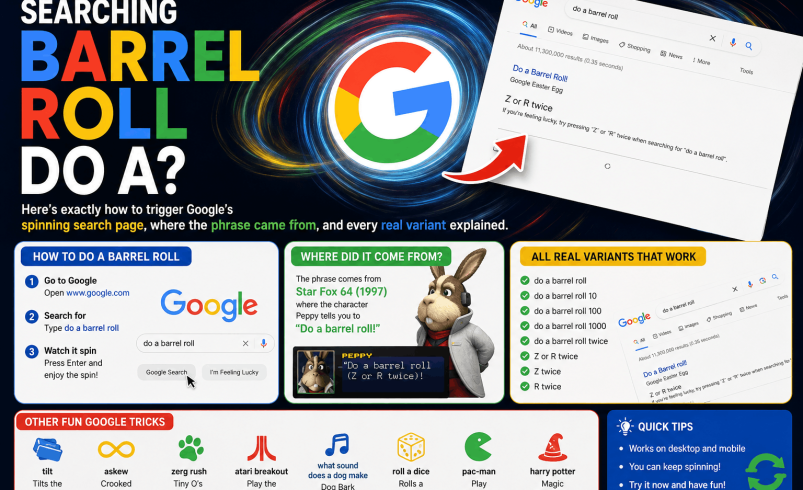
Go to Google, type do a barrel roll into the search box, and press enter. The results page rotates 360 degrees using a smooth CSS animation, then lands back exactly as it was, with every link and button still fully working. That’s it. No download, no extension, and no risk to your device.
The line has nothing to do with search engines originally. It’s a direct callback to Star Fox 64, the Nintendo 64 game released in 1997, where a character called Peppy Hare shouts “do a barrel roll!” to warn the player to dodge incoming enemy fire. Players triggered the actual manoeuvre in-game by pressing the Z button or the R button twice in quick succession, which is also where the lesser-known “z or r twice” trigger phrase comes from.
The line became a running gaming joke long before Google got involved, often used as a way of telling someone their request was over-the-top or ridiculous. A Google engineer picked it up in 2011 and turned the meme into a working feature buried inside search itself.
Google switched the trick on on 3 November 2011. At the time, the goal was less about the joke itself and more about showing off what a relatively new web technology called CSS3 could do inside a browser. Before CSS3 became standard, animating an entire webpage smoothly like this would have taken far more effort, so the barrel roll doubled as a neat demonstration of how far browser capabilities had come.
There are two phrases that reliably trigger the official version, and both still work as of this year.
Head to google.com, click into the search bar, and type do a barrel roll exactly as written. Press enter or click the search button, and the results page will spin once before returning to normal. This is by far the most common way people find the trick.
This is the deeper cut, referencing the actual button press from Star Fox 64. Type z or r twice into the same search bar and the effect triggers identically to the main phrase. It’s a nice one to try if you want to see whether a search engine trivia friend actually knows their gaming history.
Short answer: not on Google itself. Google’s own implementation performs exactly one spin per search, no matter how many times you search the phrase or how you word it. If you’re looking for do a barrel roll x200, or similar variants like “barrel roll 100 times” or “do a rolling barrel,” what you’re actually looking for is a fan-built website, not a genuine Google feature.
Several independent sites, built purely for fun, let you pick a number of spins, sometimes ranging from just a couple up to absurd figures like a million, and simulate the effect using their own CSS animations. These sites aren’t affiliated with Google in any way, so treat any specific number they promise as a bit of showmanship rather than a hidden setting inside Google Search itself. They’re generally safe to use for a laugh, but there’s no genuine way to make Google’s own search page repeat the spin automatically.
Search terms like do a rolling barrel, do barrel roll, or do the a barrel roll are all just misremembered or mistyped versions of the same phrase. None of these exact wordings trigger the effect on Google directly, since the phrase matching is fairly literal. If you land on a page ranking for one of these typo variants and it does show a spinning animation, you’re almost certainly on a fan-made replica site again rather than Google’s own search results.
The safest bet is always to use the two confirmed official phrases above, do a barrel roll or z or r twice, typed directly into google.com.
Yes, in every modern browser, including Chrome, Firefox, Safari, and Edge. The trick relies on standard CSS3 transforms, which have been widely supported for well over a decade now, so compatibility issues are rare. If it doesn’t work for you, the most likely cause isn’t your browser but a setting.
Google’s implementation respects “reduce motion” accessibility settings on some devices and browsers, meaning if you’ve turned on reduced motion in your operating system to limit animations for comfort or accessibility reasons, the spin may be skipped or shortened automatically. That’s a sensible design choice rather than a bug.
Yes, the trick works in the Google app and mobile browsers in largely the same way as on desktop. There’s also a voice-activated version through Google Assistant on Android, a holdover from the older Google Now feature: saying a phrase like “do a barrel roll” to your phone can trigger the same spinning animation on screen, without you needing to type anything at all.
It’s a fair question, and Google has never pretended it was solving a real problem. Search Easter eggs like this exist partly as internal fun for engineers, and partly as small, low-stakes moments of delight for users stumbling across them unexpectedly. They cost Google very little to build and maintain, and they’ve generated a genuinely huge amount of free publicity and goodwill over the years purely through word of mouth.
It’s also worth remembering this sits within a much longer tradition at Google of hiding small jokes inside otherwise serious software, something that goes back to the company’s earliest years.
If barrel roll do a is the trick that brought you here, it’s just one of dozens Google has quietly built into search over the years. A few worth trying next:
Completely. It’s a purely visual CSS animation running inside your browser tab. Nothing gets downloaded, no software gets installed, and it has no effect on your device, your account, or your search history beyond the single search query itself. It’s about as low-risk as internet tricks get, which is a big part of why it’s stayed popular with parents letting kids try it on a shared laptop.
Type do a barrel roll into the Google search bar and press enter, and the entire results page will spin 360 degrees once before returning to normal. The alternative trigger phrase z or r twice produces exactly the same effect.
It’s a hidden Easter egg feature where the search results page performs one full spinning rotation, purely as a visual joke with no functional purpose. The phrase originally comes from the 1997 game Star Fox 64, where a character shouts it as gameplay advice.
Not through Google’s own search page, which only performs one spin regardless of how the phrase is worded. Sites offering “x100” or “x200” versions are unofficial fan-built pages using their own separate animations, not a hidden Google setting.
Yes, the Easter egg is still active and works the same way it has since it launched on 3 November 2011. It functions across all major modern browsers on both desktop and mobile.
The most common cause is a reduce motion accessibility setting turned on in your operating system, which can suppress or shorten the animation deliberately. It’s also worth double checking you’ve typed the phrase exactly, since close variants and typos won’t trigger it.
Not on Google’s own search page, which runs a fixed single-speed animation with no user controls. Some third-party fan sites offer adjustable speed and repeat settings, but these run on their own code rather than modifying Google’s actual search behaviour.
It comes from Star Fox 64 on the Nintendo 64, where the character Peppy Hare tells the player to “do a barrel roll” to dodge enemy attacks. The phrase became a well-known gaming meme years before Google turned it into a search Easter egg in 2011.
Yes, Google has built in dozens of small hidden features over the years, including Zerg Rush, Thanos, and a tilted page effect triggered by searching “askew.” Most are free to try any time and carry no risk to your device or account.