Selenite Games, sometimes searched as Project Selenite, is an unblocked gaming website that’s built specifically to get past school and workplace internet filters. If you’re a parent, teacher or IT lead who’s spotted the name and wants to understand what it actually is, here’s the short version: it’s a proxy site that hosts hundreds of browser games, and its standout feature is a disguise system that hides what a student is doing the moment someone looks at their screen.
This isn’t a guide to using Selenite. It’s a plain-language look at how sites like it work, why schools block them, and what you can actually do about it, whether you’re managing a classroom, a school network, or a child’s laptop at home.
What Is Selenite Games?
Selenite is what’s known in schools and IT circles as an unblocked games proxy. It hosts a large library of browser-based games, reportedly running into the hundreds, and is designed to load on networks that would normally block gaming sites outright. Students share links to it on Discord servers and social media, and because the underlying address changes fairly often, a link that works one week may not work the next.
That constant shifting is deliberate. Filtering systems work by recognising known site addresses and content, so a moving target is harder to keep blocked than a fixed one.
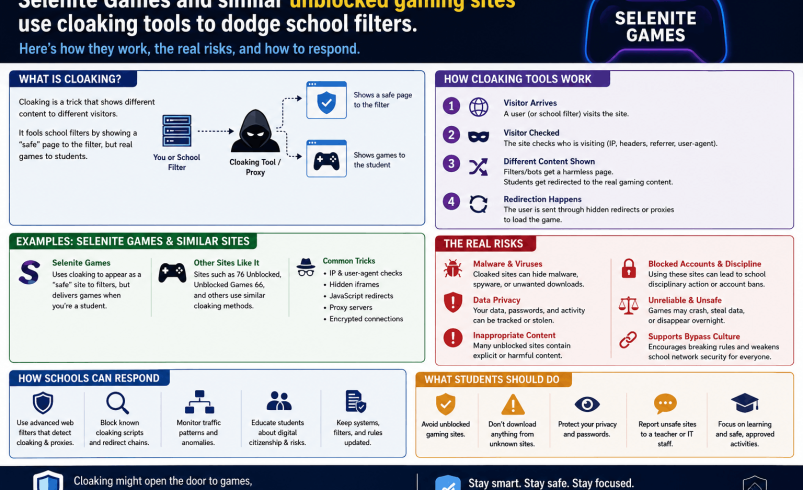
How Selenite and Sites Like It Get Past School Filters
Most school networks rely on web filters that check a site’s address, its declared content, and sometimes its page title against a blocklist. Selenite gets round this with a few specific tricks worth understanding.
- Domain hopping: the site regularly moves to new web addresses, so a blocklist entry goes stale within weeks or months
- Disguised page details: the site’s title and description are set to mimic an unrelated, harmless resource, in this case a maths revision page, so filters and casual glances both see something innocuous
- A “tab cloak” feature: this instantly changes what’s shown in the browser tab to make it look like a different, approved site
- A “panic button”: built specifically to hide the game the moment a teacher or parent approaches, switching the screen to something unremarkable in a single click
None of this is accidental. These are the core selling points of the site, not side effects, and they exist to defeat exactly the kind of oversight a school or parent is trying to maintain.
Projects Selenite: Why the Name Keeps Changing
You’ll sometimes see this searched as “projects selenite” or “project selenite”. That’s not a separate product, it reflects how these sites brand themselves and their spin-off links as they get blocked and rebuilt. A school that successfully blocks one address may find a near-identical site under a slightly different name within days, run by the same community or a copycat.
This pattern is common across the wider unblocked games ecosystem, not unique to Selenite. Filtering one domain rarely solves the underlying problem, because the incentive to rebuild and re-share is high among the student communities that use these tools.
Why Schools and Workplaces Block These Sites in the First Place
Filtering isn’t just about stopping games during lessons, although that’s part of it. There are genuine technical and safety reasons behind it too.
Sites like this typically rely on advertising to stay funded, and that advertising is often poorly vetted. Security researchers have repeatedly flagged unblocked games sites as a common source of malvertising, unwanted browser extensions, and redirect chains that lead somewhere far less innocent than a game. A school network exists partly to protect a shared, managed set of devices, so one compromised machine can be a real problem for the whole network, not just the student using it.
There’s also the deception angle specific to sites like Selenite. A panic button and tab cloaking feature aren’t there to protect a child from a genuine online risk. They exist purely to stop a supervising adult from seeing what’s actually happening on the screen, which undermines the basic purpose of school device monitoring.
The Real Risks Involved
Malvertising and Unwanted Downloads
Free gaming proxies are typically ad-funded, and the ad networks that will work with sites like this tend to be lower quality than those used by mainstream platforms. Clicking the wrong ad or pop-up can trigger automatic downloads, redirect to phishing pages, or push a fake “update” prompt designed to install unwanted software.
Data and Privacy Exposure
Some proxy sites ask for account sign-ups, Discord verification, or browser permissions to unlock extra features or faster access. Handing over an email address, a Discord identity, or browser permissions to an anonymously run site is a genuine privacy risk, particularly for younger users who may not think through what they’re agreeing to.
Extensions and VPNs That Do More Than Advertised
Some routes into these sites involve browser extensions or free VPN tools that claim to help access blocked content. Security researchers have consistently warned that free VPN services often monetise by collecting and selling user data, and some browser “unblocker” extensions have been found to behave as spyware. Anything asking for broad permissions in exchange for unblocking games deserves real scepticism.
The Cloaking Itself Is a Red Flag
A tool designed to hide activity from supervision is, by definition, working against the safeguards a school or parent has put in place. Even setting aside the technical risks above, that’s worth taking seriously on its own, because it’s a sign the site expects its use to be something the user needs to hide.
What Parents Can Actually Do
- Talk about it directly, rather than relying on blocking alone. Cloaking tools exist specifically because blocking alone doesn’t work, so a conversation about why school networks are filtered carries more weight than a technical fix on its own
- Use device-level monitoring rather than network filtering only, since network filters can be bypassed with a personal hotspot or mobile data in a way that on-device tools generally can’t
- Check browser extensions periodically on any device your child uses for school, and remove anything you don’t recognise or can’t explain
- Set expectations about school-issued devices clearly, including what happens if cloaking or bypass tools are found, before it becomes an issue rather than after
What Schools and IT Staff Can Do
Filtering by domain alone is a losing game against a site that moves addresses regularly. A more resilient approach usually combines a few layers.
Keyword and page-title filtering can catch sites even after they’ve moved to a new address, since the underlying content and structure often stay recognisable even when the domain changes. Monitoring tools that flag unusual patterns, such as a browser tab whose title suddenly doesn’t match its actual traffic, can catch cloaking behaviour that a standard blocklist misses entirely. Clear, consistently enforced acceptable use policies also matter, since students are less likely to seek out bypass tools if the consequences of being caught are well understood and applied fairly.
FAQ
What is Selenite Games?
Selenite Games is an unblocked gaming proxy website that hosts a large library of browser games and is designed to work on networks that normally block gaming sites, including school networks.
Is Selenite Games illegal?
No, using it isn’t generally illegal in the UK, but it typically breaches a school or workplace’s acceptable use policy, and its cloaking features are specifically built to help users hide that breach from supervision.
What does “tab cloaking” mean?
Tab cloaking is a feature that changes how a browser tab appears, showing a different title and icon than the actual page content, so a game can be disguised as an unrelated site like a maths resource.
Is Selenite Games safe to use?
It carries real risks. Ad-funded proxy sites like this are a common source of malvertising and unwanted downloads, and features designed to evade supervision are, by nature, working against the protections a school or parent has put in place.
Why do schools block sites like Selenite Games?
Schools block them to reduce distraction during lessons and to protect shared devices and networks from the security risks that come with poorly vetted advertising and unofficial browser extensions.
Can schools actually stop students accessing sites like this?
Not completely through domain blocking alone, since these sites deliberately change address. A layered approach combining keyword filtering, device monitoring and clear policy enforcement is more effective than blocking one address at a time.
What should I do if I find this on my child’s device?
Start with a direct conversation rather than only a technical fix, then check for any browser extensions or VPN tools you don’t recognise, since these often accompany bypass attempts.
Are all unblocked games sites like this?
No. Some educational gaming platforms are legitimate and safe, using recognised domains without cloaking features. The concern here is specifically with proxy sites built around deliberately hiding activity from supervision.