
127.0.0.1:62893 Explained: What This Address Means
- August 19, 2026
- 0
If 127.0.0.1:62893 just showed up in your browser, terminal, or an error message, here’s the short answer: 127.0.0.1 is “localhost”, a special address that always points back to



9621 Agnes Crossing, Lake Suzanneview, New Mexico Island 84604-9295.
If 127.0.0.1:62893 just showed up in your browser, terminal, or an error message, here’s the short answer: 127.0.0.1 is “localhost”, a special address that always points back to
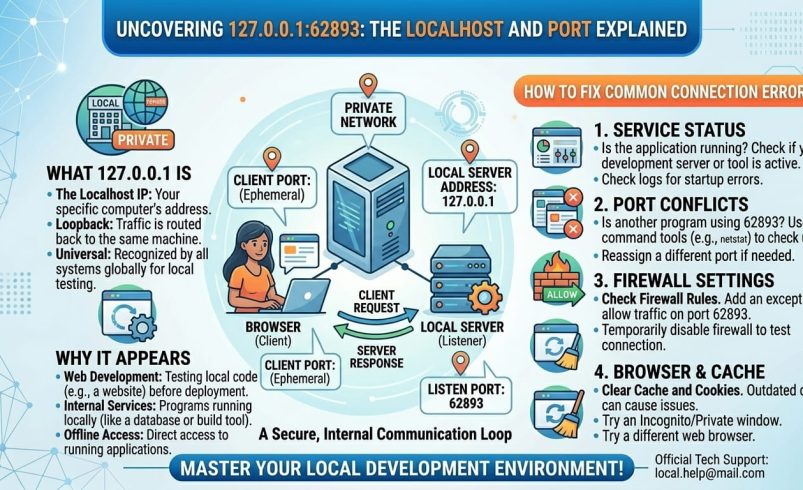
If 127.0.0.1:62893 just showed up in your browser, terminal, or an error message, here’s the short answer: 127.0.0.1 is “localhost”, a special address that always points back to your own computer, and 62893 is a port number, a temporary door number that a piece of software opened on that machine. Together, they mean “a program running on this computer, listening on port 62893.” It’s not a website, a company, or anything reachable from outside your machine. Below, we’ll cover what each part means, why the port number looks so random, and how to fix the errors people usually see alongside it.
127.0.0.1 is the standard loopback address in IPv4 networking. Any request sent to it never leaves your device. It “loops back” to the same machine that sent it, which is why it’s commonly called localhost.
Every computer, phone and server that supports networking treats 127.0.0.1 this way, so it isn’t unique to you or your setup. Developers use it constantly to test websites, apps and services on their own machine before anything goes live on the internet.
The number after the colon is a port. A port is how one machine can run several different network services at once without them clashing, since each service listens on its own numbered port rather than all sharing one line.
Ports run from 0 to 65535. Port 62893 sits in what’s called the ephemeral (or dynamic) range, roughly 49152 to 65535, which operating systems hand out automatically and temporarily. That’s why the number looks arbitrary: it usually is. The operating system picked it at random from the available range when the connection was made, and it won’t necessarily be the same number next time.
A handful of everyday situations produce an address like this:
Because the exact port is often assigned by the system rather than chosen by a developer, don’t assume 62893 specifically means anything. Two different programs on two different days could easily both grab that same number.
This means nothing is currently listening on that port. Whatever program was meant to be running there, a dev server, a local API, a testing tool, either hasn’t started yet, has already stopped, or crashed. Check the terminal or app that was supposed to start it and look for an error in its output.
Functionally the same issue as above: the browser tried to open a connection to 127.0.0.1:62893 and got no response at all, as opposed to an error page from the server itself. Restart whatever process is meant to serve that port.
This usually means the service is running but isn’t fully set up yet, is still compiling, or is serving the wrong content for that route. Check the server’s console output for build errors before assuming the browser is at fault.
If you’re the one trying to start a service and get an error saying the port is already in use, another running process has already claimed it. On Windows, netstat -ano | findstr :62893 shows you the process ID using that port; on macOS or Linux, lsof -i :62893 does the same job.
Yes, on its own it’s completely safe. Because loopback traffic never reaches your router or the wider internet, nobody outside your machine can access a service running on 127.0.0.1, whatever port it uses. It’s one of the safer addresses you’ll encounter precisely because it’s locked to your own device.
The one caveat: if a piece of software you don’t recognise is listening on a local port and you’re unsure why, it’s reasonable to check what process is using it (using the netstat or lsof commands above) rather than assuming it’s automatically fine. That’s a general good practice for any unfamiliar local process, not something specific to this address.
If you started the service yourself, the cleanest way to stop it is usually to return to the terminal window where you launched it and press Ctrl+C (or Cmd+C on a Mac). If you’ve lost track of the terminal, you can kill it directly:
No. It points to a service running locally on your own computer, not a public website anyone else can visit. If you see it in a browser tab, something on your machine (usually a development tool) put it there.
Ephemeral ports, the range 62893 falls into, are assigned automatically by the operating system rather than fixed by the software itself. Each time a program requests a local port without specifying one, the system hands out whichever free number happens to be available at that moment.
No, not directly. Loopback addresses are restricted to the device itself, so nobody outside your computer can reach a service bound only to 127.0.0.1, regardless of the port number.
It means nothing is currently listening on that port. Whatever local service was supposed to be running (a dev server, API, or tool) has either not started yet or has stopped, so check its console output for the actual cause.
How do I find out what’s using port 62893? On Windows, run netstat -ano | findstr :62893 in Command Prompt. On macOS or Linux, run lsof -i :62893 in Terminal. Both show you the process ID, which you can then look up or stop.
Generally yes, provided you know what the program is and you’re not in the middle of using it. If you don’t recognise the process at all, it’s worth checking what it is before force-closing it, since some background system services also use local ports.
This usually happens when a development tool or IDE is configured to open your browser automatically at startup, pointing at whatever local port it just bound to. Check the tool’s configuration or startup script if you want to disable that behaviour.


